Appearance
s07 — 上下文压缩:无限对话的秘密
"Forget wisely, remember what matters" · 预计阅读 18 分钟
核心洞察:微压缩用零成本裁剪把自动压缩的触发频率降低了 80%——最好的 API 调用是不需要发出的那一次。
Key Takeaways
- 三层压缩策略 — micro-compact (工具结果裁剪) → auto-compact (阈值触发摘要) → manual-compact (手动)
- LLM 做摘要 — 用一次额外的 API 调用将旧消息压缩为摘要,保留关键信息
- compact_boundary 标记 — 分隔"已压缩"和"完整保留"的消息边界
- Context Engineering = Compress — 这是四策略中最直接的压缩实现
问题
对话越来越长,上下文窗口装不下了怎么办?
LLM 有固定的上下文窗口(比如 200K tokens)。一次对话中,用户的每条消息、每次工具调用的输入和输出、模型的每次回复,全部累积在上下文里。当你让 agent 读 10 个文件、运行 5 次命令后,token 用量可能已经超过 100K。
如果什么都不做,最终 API 会返回 prompt_too_long 错误,对话直接中断。用户只能开新会话,从零开始——之前的讨论、修改的文件、发现的 bug,全部丢失。
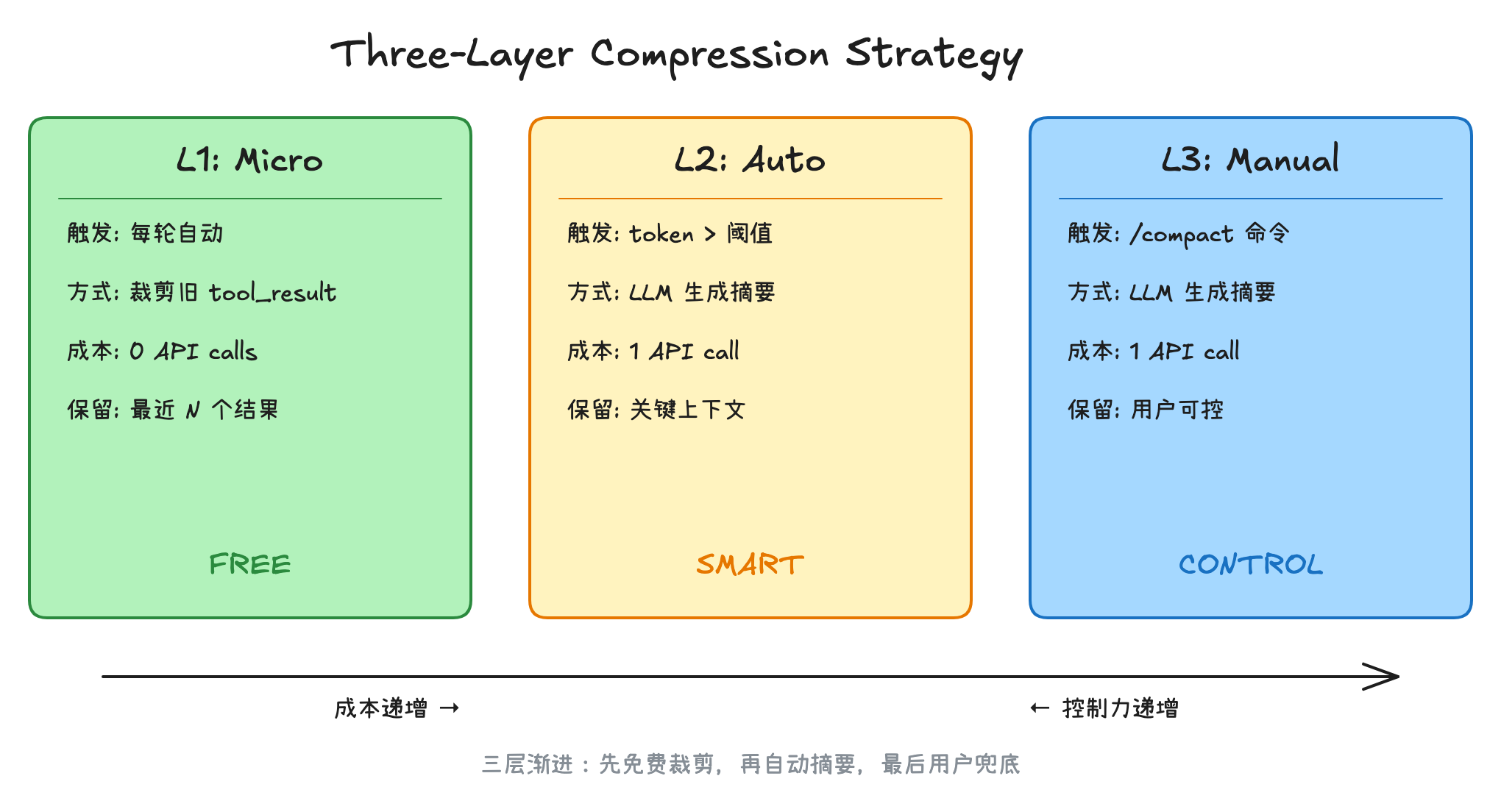
Claude Code 用三层渐进式压缩解决这个问题:从最廉价的局部替换,到中等成本的自动摘要,再到用户主动触发的手动压缩。三层各有触发条件,层层递进,确保对话可以无限进行下去。
架构图
核心机制
Layer 1: 微压缩 (Micro Compact)
微压缩是成本最低的压缩策略——不调用任何 API,只是把旧的 tool_result 内容替换为占位符字符串 [Old tool result content cleared]。
具体来说,Claude Code 维护了一个"可压缩工具"列表:
Read, Bash, Grep, Glob, WebSearch, WebFetch, Edit, Write注意:
COMPACTABLE_TOOLS列表中的Bash实际上来自SHELL_TOOL_NAMES,它可能包含多个 shell 工具(不仅是 Bash),例如在不同平台或配置下可能存在其他 shell 工具变体。
这些工具的历史输出往往很大(比如一次 grep 可能返回几百行),但对后续对话的价值递减——模型早已处理过了。微压缩会保留最近 N 个工具结果,清除更早的。
微压缩有两种触发方式:
计数触发(Cached Micro Compact):当可压缩的 tool_result 数量超过阈值时触发。这种方式利用 API 的 cache_edits 能力,在不破坏 prompt cache 的前提下删除旧的工具结果——这意味着不仅省了上下文空间,连 cache 都不用重建。
时间触发(Time-based Micro Compact):当距离上次助手回复超过一定时间(比如 1 小时)时触发。此时 server 端缓存已经过期了,不需要保留缓存兼容性,直接修改消息内容即可。
Layer 2: 自动压缩 (Auto Compact)
当微压缩不够用,token 用量逼近上下文窗口极限时,自动压缩介入。
触发条件:
tokenCount >= effectiveContextWindow - AUTOCOMPACT_BUFFER_TOKENS (13,000)其中 effectiveContextWindow = contextWindow - maxOutputTokens(要给模型留输出空间)。
自动压缩的流程:
- 先尝试 Session Memory Compaction——一种更轻量的压缩,保留最近的消息,只压缩更早的部分
- 如果不适用,执行完整的 LLM 摘要压缩:把整个对话发给模型,要求生成结构化摘要
摘要 prompt 要求模型输出 9 个部分:Primary Request、Key Technical Concepts、Files and Code、Errors and Fixes、Problem Solving、All User Messages、Pending Tasks、Current Work、Optional Next Step。
关键设计:摘要 prompt 中有一个 <analysis> scratchpad,让模型先做分析再写摘要,提高摘要质量。最终注入上下文时,<analysis> 部分会被 formatCompactSummary() 去掉,只保留 <summary>。
防工具调用设计:压缩 prompt 前置了 NO_TOOLS_PREAMBLE,明确禁止模型在摘要任务中调用工具(prompt.ts:19-26)。这是针对 Sonnet 4.6+ 在 maxTurns: 1 下仍尝试调用工具的问题(2.79% vs 0.01% 的差异)。
熔断器:如果连续自动压缩失败超过 3 次,停止重试,避免无限循环浪费 API 调用。
Layer 3: 手动压缩 (Manual Compact)
用户通过 /compact 命令主动触发。与自动压缩的核心逻辑相同,但有几个区别:
- 可以附加自定义指令(比如 "压缩时重点保留测试相关的代码")
- 支持局部压缩(Partial Compact):用户可以选择一条消息作为分界点,只压缩该消息之前或之后的内容
- 不抑制后续问题——自动压缩会告诉模型"不要问问题直接继续",手动压缩不会
压缩后恢复
压缩不是简单地丢掉旧消息。Claude Code 会在压缩后做一系列恢复工作:
- 文件恢复:把最近读取的 5 个文件重新注入上下文(token budget 50K),这样模型不需要重新读取
- Skill 恢复:把已调用的 Skill 内容重新注入(每个 Skill 最多 5K tokens,总共 25K budget)
- Plan 恢复:如果存在 Plan 文件,重新注入
- Agent 状态恢复:如果有异步子 Agent 在运行,重新通知模型
- 工具声明恢复:重新声明 deferred tools 和 MCP 工具
- Hook 执行:运行 pre_compact / post_compact / session_start hooks
Layer 0: API 原生上下文管理
src/services/compact/apiMicrocompact.ts 中的 getAPIContextManagement() 实现了服务端压缩策略,利用 Anthropic API 的原生 context_management 能力在服务端直接清除旧 tool_result。这与客户端微压缩互补——客户端在本地替换旧结果为占位符,API 层则在服务端做更激进的清理。
转录持久化
压缩前的完整对话被写入 .transcripts/ 目录。摘要消息中会包含转录路径,告诉模型:"如果你需要压缩前的具体细节(代码片段、错误信息等),可以读取转录文件"。
这是一个精妙的设计——摘要提供概览,转录提供精确回溯能力。模型可以按需回到转录里查找任何细节。
Python 伪代码
三层压缩的核心逻辑:
python
# 三层压缩(精简版)

# Layer 1: 微压缩 — 零成本,每轮自动
def micro_compact(messages):
    """把旧的 tool_result 替换为占位符,保留最近 N 个"""
    for msg in messages[:-KEEP_RECENT]:
        if msg.role == "tool_result" and msg.tool in COMPACTABLE_TOOLS:
            msg.content = "[Old tool result cleared]"  # 零 API 调用

# Layer 2: 自动压缩 — token 超阈值时触发
def auto_compact(messages, token_count, threshold):
    """用 LLM 将旧消息摘要为简短总结"""
    if token_count < threshold:
        return  # 未触发
    old, recent = split_at_boundary(messages)
    summary = llm_summarize(old)           # 1 次 API 调用
    return [summary_message] + recent      # 摘要 + 最近消息

# Layer 3: 手动压缩 — 用户 /compact 触发
def manual_compact(messages, instructions=""):
    """同 auto_compact,但用户可附加压缩指令"""
    summary = llm_summarize(messages, extra=instructions)
    save_transcript(messages)              # 保留原始对话到 .transcripts/
    return [summary_message]
完整参考实现(含边界标记、转录持久化、上下文恢复):
展开查看完整 Python 伪代码(641 行)
python
"""
Claude Code 三层压缩引擎的 Python 参考实现。

三层策略:
  Layer 1 - 微压缩:替换旧 tool_result,零 API 调用
  Layer 2 - 自动压缩:token 超阈值,LLM 生成摘要
  Layer 3 - 手动压缩:用户 /compact 触发
"""

from dataclasses import dataclass, field
from typing import Optional
from enum import Enum


# ─── 常量 ──────────────────────────────────────────────

AUTOCOMPACT_BUFFER_TOKENS = 13_000
MAX_OUTPUT_TOKENS_FOR_SUMMARY = 20_000
POST_COMPACT_MAX_FILES = 5
POST_COMPACT_TOKEN_BUDGET = 50_000
POST_COMPACT_SKILLS_TOKEN_BUDGET = 25_000
MAX_CONSECUTIVE_FAILURES = 3
CLEARED_MESSAGE = "[Old tool result content cleared]"

COMPACTABLE_TOOLS = {
    "Read", "Bash", "Grep", "Glob",
    "WebSearch", "WebFetch", "Edit", "Write",
}


class CompactTrigger(Enum):
    AUTO = "auto"
    MANUAL = "manual"


@dataclass
class Message:
    role: str                    # "user" | "assistant" | "system"
    content: list                # 消息内容块列表
    uuid: str = ""
    timestamp: float = 0.0
    is_compact_summary: bool = False
    tool_use_id: str = ""       # tool_result 的引用 ID
    tool_name: str = ""         # tool_use 的工具名


@dataclass
class CompactBoundary:
    """压缩边界标记——标识压缩发生的位置"""
    trigger: CompactTrigger
    pre_compact_tokens: int
    previous_message_uuid: str = ""
    pre_compact_discovered_tools: list = field(default_factory=list)


@dataclass
class CompactionResult:
    boundary: CompactBoundary
    summary_messages: list[Message]
    attachments: list[Message]    # 文件恢复、Skill 恢复等
    messages_to_keep: list[Message] = field(default_factory=list)
    pre_compact_tokens: int = 0
    post_compact_tokens: int = 0


# ─── Layer 1: 微压缩 ────────────────────────────────────

@dataclass
class MicroCompactState:
    """跟踪已注册的 tool_result,决定哪些可以清除"""
    tool_order: list[str] = field(default_factory=list)      # 按出现顺序
    registered_tools: set[str] = field(default_factory=set)   # 已注册的 tool_use_id
    deleted_refs: set[str] = field(default_factory=set)       # 已通过 cache_edits 删除的

    # 配置
    trigger_threshold: int = 20   # 超过此数量触发
    keep_recent: int = 5          # 保留最近 N 个


class MicroCompactEngine:
    """Layer 1: 零成本微压缩"""

    def __init__(self):
        self.state = MicroCompactState()

    def collect_compactable_tool_ids(self, messages: list[Message]) -> list[str]:
        """收集所有可压缩工具的 tool_use_id"""
        ids = []
        for msg in messages:
            if msg.role == "assistant":
                for block in msg.content:
                    if (block.get("type") == "tool_use"
                            and block.get("name") in COMPACTABLE_TOOLS):
                        ids.append(block["id"])
        return ids

    def time_based_compact(
        self,
        messages: list[Message],
        gap_minutes: float,
        gap_threshold: float = 60.0,
        keep_recent: int = 5,
    ) -> Optional[list[Message]]:
        """
        时间触发微压缩:距上次助手回复超过阈值时,
        清除旧 tool_result 内容。缓存已过期,直接改内容。
        """
        if gap_minutes < gap_threshold:
            return None

        compactable_ids = self.collect_compactable_tool_ids(messages)
        keep_recent = max(1, keep_recent)
        keep_set = set(compactable_ids[-keep_recent:])
        clear_set = set(id for id in compactable_ids if id not in keep_set)

        if not clear_set:
            return None

        result = []
        for msg in messages:
            if msg.role != "user":
                result.append(msg)
                continue

            new_content = []
            touched = False
            for block in msg.content:
                if (block.get("type") == "tool_result"
                        and block.get("tool_use_id") in clear_set
                        and block.get("content") != CLEARED_MESSAGE):
                    new_content.append({
                        **block,
                        "content": CLEARED_MESSAGE,
                    })
                    touched = True
                else:
                    new_content.append(block)

            if touched:
                result.append(Message(
                    role=msg.role,
                    content=new_content,
                    uuid=msg.uuid,
                    timestamp=msg.timestamp,
                ))
            else:
                result.append(msg)

        return result

    def cached_compact(
        self,
        messages: list[Message],
    ) -> Optional[dict]:
        """
        计数触发微压缩:通过 cache_edits API 删除旧 tool_result,
        不破坏 prompt cache。返回 cache_edits 指令而非修改消息。
        """
        compactable_ids = set(self.collect_compactable_tool_ids(messages))

        # 注册新的 tool_result
        for msg in messages:
            if msg.role == "user":
                for block in msg.content:
                    if (block.get("type") == "tool_result"
                            and block.get("tool_use_id") in compactable_ids
                            and block["tool_use_id"] not in self.state.registered_tools):
                        self.state.registered_tools.add(block["tool_use_id"])
                        self.state.tool_order.append(block["tool_use_id"])

        # 检查是否需要压缩
        active_count = len(self.state.tool_order) - len(self.state.deleted_refs)
        if active_count <= self.state.trigger_threshold:
            return None

        # 计算要删除的 tool_result
        active_tools = [
            tid for tid in self.state.tool_order
            if tid not in self.state.deleted_refs
        ]
        to_delete = active_tools[:-self.state.keep_recent]

        if not to_delete:
            return None

        # 标记为已删除
        self.state.deleted_refs.update(to_delete)

        # 返回 cache_edits 指令(API 层处理)
        return {
            "type": "cache_edits",
            "edits": [
                {"type": "delete", "tool_use_id": tid}
                for tid in to_delete
            ],
        }


def micro_compact(
    messages: list[Message],
    gap_minutes: float = 0.0,
) -> tuple[list[Message], Optional[dict]]:
    """
    微压缩入口:先尝试时间触发,再尝试缓存编辑。
    返回 (可能修改的消息列表, 可能的 cache_edits 指令)。
    """
    engine = MicroCompactEngine()

    # 时间触发优先(cache 已过期,直接改内容)
    time_result = engine.time_based_compact(messages, gap_minutes)
    if time_result is not None:
        return time_result, None

    # 缓存编辑(保持 cache 热度)
    cache_edits = engine.cached_compact(messages)
    return messages, cache_edits


# ─── Layer 2 & 3: LLM 摘要压缩 ──────────────────────────

COMPACT_PROMPT_TEMPLATE = """Your task is to create a detailed summary of the conversation so far.

Before providing your final summary, wrap your analysis in <analysis> tags.
In your analysis:
1. Chronologically analyze each section of the conversation
2. Identify: user requests, approach, key decisions, code patterns,
   file names, code snippets, errors and fixes
3. Pay special attention to user feedback

Your summary should include these sections:
1. Primary Request and Intent
2. Key Technical Concepts
3. Files and Code Sections (with snippets)
4. Errors and fixes
5. Problem Solving
6. All user messages (non-tool-result)
7. Pending Tasks
8. Current Work
9. Optional Next Step

{custom_instructions}
"""


def format_compact_summary(raw_summary: str) -> str:
    """去掉 <analysis> scratchpad,只保留 <summary> 内容"""
    import re

    # 移除 analysis 部分
    result = re.sub(r"<analysis>[\s\S]*?</analysis>", "", raw_summary)

    # 提取 summary 内容
    match = re.search(r"<summary>([\s\S]*?)</summary>", result)
    if match:
        content = match.group(1).strip()
        result = result.replace(match.group(0), f"Summary:\n{content}")

    # 清理多余空行
    result = re.sub(r"\n\n+", "\n\n", result)
    return result.strip()


def get_effective_context_window(model: str) -> int:
    """计算有效上下文窗口大小"""
    context_window = get_context_window_for_model(model)  # e.g., 200_000
    max_output = get_max_output_tokens(model)              # e.g., 16_384
    reserved = min(max_output, MAX_OUTPUT_TOKENS_FOR_SUMMARY)
    return context_window - reserved


def should_auto_compact(messages: list[Message], model: str) -> bool:
    """判断是否需要自动压缩"""
    effective_window = get_effective_context_window(model)
    threshold = effective_window - AUTOCOMPACT_BUFFER_TOKENS
    token_count = estimate_token_count(messages)
    return token_count >= threshold


class CompactionEngine:
    """三层压缩引擎"""

    def __init__(self, model: str = "claude-sonnet-4-20250514"):
        self.model = model
        self.micro_engine = MicroCompactEngine()
        self.consecutive_failures = 0
        self.transcript_path = ".transcripts/"

    # ── Layer 2: 自动压缩 ──

    async def auto_compact_if_needed(
        self,
        messages: list[Message],
    ) -> Optional[CompactionResult]:
        """自动压缩:token 超阈值时触发"""

        # 熔断器:连续失败过多则跳过
        if self.consecutive_failures >= MAX_CONSECUTIVE_FAILURES:
            return None

        if not should_auto_compact(messages, self.model):
            return None

        try:
            result = await self._compact_conversation(
                messages=messages,
                is_auto=True,
                suppress_questions=True,
            )
            self.consecutive_failures = 0
            return result
        except Exception:
            self.consecutive_failures += 1
            return None

    # ── Layer 3: 手动压缩 ──

    async def manual_compact(
        self,
        messages: list[Message],
        custom_instructions: str = "",
    ) -> CompactionResult:
        """手动压缩:用户 /compact 触发"""
        return await self._compact_conversation(
            messages=messages,
            is_auto=False,
            suppress_questions=False,
            custom_instructions=custom_instructions,
        )

    async def partial_compact(
        self,
        messages: list[Message],
        pivot_index: int,
        direction: str = "from",    # "from" 或 "up_to"
        user_feedback: str = "",
    ) -> CompactionResult:
        """
        局部压缩:用户选择一条消息作为分界点。
        - direction='from': 压缩 pivot 之后的消息,保留之前的(保持缓存)
        - direction='up_to': 压缩 pivot 之前的消息,保留之后的
        """
        if direction == "up_to":
            to_summarize = messages[:pivot_index]
            to_keep = messages[pivot_index:]
        else:
            to_summarize = messages[pivot_index:]
            to_keep = messages[:pivot_index]

        summary = await self._generate_summary(
            to_summarize, direction=direction
        )
        return self._build_result(
            messages, summary,
            is_auto=False,
            messages_to_keep=to_keep,
        )

    # ── 内部实现 ──

    async def _compact_conversation(
        self,
        messages: list[Message],
        is_auto: bool,
        suppress_questions: bool,
        custom_instructions: str = "",
    ) -> CompactionResult:
        """执行完整的 LLM 摘要压缩"""

        pre_compact_tokens = estimate_token_count(messages)

        # 1. 执行 pre_compact hooks
        hook_instructions = await execute_pre_compact_hooks(
            trigger="auto" if is_auto else "manual"
        )
        if hook_instructions:
            custom_instructions = f"{custom_instructions}\n\n{hook_instructions}"

        # 2. 准备压缩 prompt
        prompt = COMPACT_PROMPT_TEMPLATE.format(
            custom_instructions=custom_instructions or ""
        )

        # 3. 预处理:去除图片、去除会被重新注入的附件
        clean_messages = self._strip_images(messages)
        clean_messages = self._strip_reinjected_attachments(clean_messages)

        # 4. 调用 LLM 生成摘要(支持 prompt-too-long 重试)
        summary = await self._generate_summary_with_retry(
            clean_messages, prompt, pre_compact_tokens
        )

        # 5. 构建结果
        return self._build_result(
            messages, summary,
            is_auto=is_auto,
            suppress_questions=suppress_questions,
        )

    async def _generate_summary_with_retry(
        self,
        messages: list[Message],
        prompt: str,
        pre_compact_tokens: int,
        max_retries: int = 3,
    ) -> str:
        """
        生成摘要,如果遇到 prompt_too_long 错误,
        截断最老的 API 轮次后重试。
        """
        current_messages = messages

        for attempt in range(max_retries + 1):
            summary = await self._call_llm_for_summary(
                current_messages, prompt
            )

            if not summary.startswith("prompt_too_long"):
                return format_compact_summary(summary)

            # 按 API 轮次分组,丢弃最老的组
            groups = group_messages_by_api_round(current_messages)
            if len(groups) < 2:
                raise Exception("Conversation too long, cannot compact")

            drop_count = max(1, int(len(groups) * 0.2))
            drop_count = min(drop_count, len(groups) - 1)
            current_messages = [
                msg for group in groups[drop_count:] for msg in group
            ]

        raise Exception("Failed to compact after retries")

    async def _generate_summary(
        self,
        messages: list[Message],
        direction: str = "full",
    ) -> str:
        """调用 LLM 生成摘要"""
        summary = await self._call_llm_for_summary(messages, "")
        return format_compact_summary(summary)

    async def _call_llm_for_summary(
        self,
        messages: list[Message],
        prompt: str,
    ) -> str:
        """实际的 LLM API 调用(mock)"""
        # 实际实现中调用 queryModelWithStreaming
        return "<analysis>...</analysis><summary>...</summary>"

    def _build_result(
        self,
        original_messages: list[Message],
        summary: str,
        is_auto: bool,
        suppress_questions: bool = False,
        messages_to_keep: list[Message] | None = None,
    ) -> CompactionResult:
        """构建压缩结果,包括所有恢复附件"""

        pre_compact_tokens = estimate_token_count(original_messages)

        # 1. 创建边界标记
        boundary = CompactBoundary(
            trigger=CompactTrigger.AUTO if is_auto else CompactTrigger.MANUAL,
            pre_compact_tokens=pre_compact_tokens,
            previous_message_uuid=original_messages[-1].uuid if original_messages else "",
        )

        # 2. 创建摘要消息
        summary_text = self._format_summary_message(
            summary, suppress_questions
        )
        summary_msg = Message(
            role="user",
            content=[{"type": "text", "text": summary_text}],
            is_compact_summary=True,
        )

        # 3. 收集恢复附件
        attachments = []
        attachments.extend(self._restore_recent_files())
        attachments.extend(self._restore_skills())
        attachments.extend(self._restore_plan())
        attachments.extend(self._restore_agent_status())
        attachments.extend(self._restore_tool_declarations())

        return CompactionResult(
            boundary=boundary,
            summary_messages=[summary_msg],
            attachments=attachments,
            messages_to_keep=messages_to_keep or [],
            pre_compact_tokens=pre_compact_tokens,
        )

    def _format_summary_message(
        self,
        summary: str,
        suppress_questions: bool,
    ) -> str:
        """格式化摘要消息,注入转录路径"""
        base = (
            "This session is being continued from a previous conversation "
            "that ran out of context. The summary below covers the earlier "
            f"portion of the conversation.\n\n{summary}"
        )

        base += (
            f"\n\nIf you need specific details from before compaction, "
            f"read the full transcript at: {self.transcript_path}"
        )

        if suppress_questions:
            base += (
                "\nContinue the conversation from where it left off "
                "without asking the user any further questions."
            )

        return base

    # ── 恢复方法 ──

    def _restore_recent_files(self) -> list[Message]:
        """恢复最近读取的文件(最多 5 个,总共 50K tokens)"""
        # 按时间倒序,逐个加入直到 budget 用完
        return []  # 实际从 readFileState cache 读取

    def _restore_skills(self) -> list[Message]:
        """恢复已调用的 Skills(每个最多 5K tokens)"""
        return []  # 实际从 invokedSkills 读取

    def _restore_plan(self) -> list[Message]:
        """恢复 Plan 文件"""
        return []  # 实际从 Plan 文件读取

    def _restore_agent_status(self) -> list[Message]:
        """恢复异步 Agent 状态"""
        return []  # 实际从 tasks 状态读取

    def _restore_tool_declarations(self) -> list[Message]:
        """重新声明 deferred tools 和 MCP 工具"""
        return []

    def _strip_images(self, messages: list[Message]) -> list[Message]:
        """移除消息中的图片块,替换为 [image] 占位符"""
        result = []
        for msg in messages:
            if msg.role != "user":
                result.append(msg)
                continue
            new_content = []
            for block in msg.content:
                if block.get("type") == "image":
                    new_content.append({"type": "text", "text": "[image]"})
                else:
                    new_content.append(block)
            result.append(Message(role=msg.role, content=new_content, uuid=msg.uuid))
        return result

    def _strip_reinjected_attachments(
        self, messages: list[Message]
    ) -> list[Message]:
        """移除压缩后会被重新注入的附件(如 skill_listing)"""
        return [
            msg for msg in messages
            if not (hasattr(msg, 'attachment_type')
                    and msg.attachment_type in ('skill_discovery', 'skill_listing'))
        ]


# ─── 辅助函数 ──────────────────────────────────────────

def group_messages_by_api_round(messages: list[Message]) -> list[list[Message]]:
    """
    按 API 轮次分组消息。每次新的 assistant 回复(不同 message.id)
    开始一个新组。这比按"用户消息"分组更细粒度——
    一次用户消息可能触发多轮 agent 循环。
    """
    groups: list[list[Message]] = []
    current: list[Message] = []
    last_assistant_id = None

    for msg in messages:
        if (msg.role == "assistant"
                and msg.uuid != last_assistant_id
                and current):
            groups.append(current)
            current = [msg]
        else:
            current.append(msg)
        if msg.role == "assistant":
            last_assistant_id = msg.uuid

    if current:
        groups.append(current)
    return groups


def estimate_token_count(messages: list[Message]) -> int:
    """粗略估算 token 数量(~4 字符/token,乘以 4/3 保守系数)"""
    total = 0
    for msg in messages:
        for block in msg.content:
            if block.get("type") == "text":
                total += len(block["text"]) // 4
            elif block.get("type") in ("image", "document"):
                total += 2000
            elif block.get("type") == "tool_result":
                content = block.get("content", "")
                if isinstance(content, str):
                    total += len(content) // 4
    return int(total * 4 / 3)


# ─── 使用示例 ──────────────────────────────────────────

async def main():
    engine = CompactionEngine(model="claude-sonnet-4-20250514")

    messages = [
        # ... 很长的对话历史 ...
    ]

    # Layer 1: 微压缩(每轮自动)
    messages, cache_edits = micro_compact(messages, gap_minutes=5.0)

    # Layer 2: 自动压缩(token 超阈值)
    result = await engine.auto_compact_if_needed(messages)
    if result:
        messages = [
            result.boundary,   # 边界标记
            *result.summary_messages,   # 摘要
            *result.messages_to_keep,   # 保留的消息
            *result.attachments,        # 恢复的上下文
        ]

    # Layer 3: 手动压缩
    result = await engine.manual_compact(
        messages,
        custom_instructions="重点保留测试代码和错误修复"
    )
源码映射
| 概念 | 真实源码路径 | 说明 |
|---|---|---|
| 微压缩主逻辑 | src/services/compact/microCompact.ts | microcompactMessages() 入口,含时间触发和缓存编辑两种路径 |
| 可压缩工具列表 | src/services/compact/microCompact.ts:41-50 | COMPACTABLE_TOOLS 常量 |
| 时间触发判断 | src/services/compact/microCompact.ts:422-444 | evaluateTimeBasedTrigger() 检查距上次助手回复的时间间隔 |
| 清除占位符 | src/services/compact/microCompact.ts:36 | TIME_BASED_MC_CLEARED_MESSAGE = '[Old tool result content cleared]' |
| 自动压缩触发 | src/services/compact/autoCompact.ts | shouldAutoCompact() + autoCompactIfNeeded() |
| 阈值计算 | src/services/compact/autoCompact.ts:73-91 | getAutoCompactThreshold() = effectiveWindow - 13K |
| 熔断器 | src/services/compact/autoCompact.ts:69-70 | MAX_CONSECUTIVE_AUTOCOMPACT_FAILURES = 3 |
| 完整压缩流程 | src/services/compact/compact.ts:387-763 | compactConversation() 核心函数 |
| 局部压缩 | src/services/compact/compact.ts:772-1106 | partialCompactConversation() |
| 压缩 prompt | src/services/compact/prompt.ts | BASE_COMPACT_PROMPT + <analysis> scratchpad 设计 |
| 摘要格式化 | src/services/compact/prompt.ts:311-335 | formatCompactSummary() 去除 analysis、提取 summary |
| prompt-too-long 重试 | src/services/compact/compact.ts:243-291 | truncateHeadForPTLRetry() 按轮次丢弃最老的消息 |
| API 轮次分组 | src/services/compact/grouping.ts | groupMessagesByApiRound() |
| 文件恢复 | src/services/compact/compact.ts:1415-1464 | createPostCompactFileAttachments() 恢复最近读取的文件 |
| Skill 恢复 | src/services/compact/compact.ts:1494-1534 | createSkillAttachmentIfNeeded() 恢复已调用 Skill |
| Session Memory Compact | src/services/compact/sessionMemoryCompact.ts | 轻量级替代方案,保留最近消息 |
| API 层微压缩 | src/services/compact/apiMicrocompact.ts | getAPIContextManagement() 使用 API 原生 context_management |
| 图片剥离 | src/services/compact/compact.ts:145-200 | stripImagesFromMessages() |
设计决策
三层压缩 vs OpenCode 两层
| 维度 | Claude Code | OpenCode |
|---|---|---|
| 策略层数 | 三层(微压缩 + 自动 + 手动) | 两层(剪枝 + 压缩) |
| 最低成本操作 | 微压缩:零 API 调用,替换旧 tool_result | 剪枝:移除旧消息(也是零成本) |
| 缓存感知 | 是:cached micro compact 通过 cache_edits 保持缓存热度 | 否 |
| 摘要结构 | 9 个固定 section + analysis scratchpad | 简单摘要 |
| 压缩后恢复 | 完整恢复体系(文件/Skill/Plan/Agent/Tool) | 较少 |
Claude Code 多出的微压缩层是关键差异。它让系统在不调用 API 的情况下就能释放大量上下文空间——一个 grep 结果可能有几千 tokens,替换为占位符只需要 10 个 tokens。这种"渐进式压缩"让自动压缩的触发频率大大降低,节省了 API 成本。
三大编码 Agent 压缩策略横评
| 维度 | Claude Code | Cursor | Aider |
|---|---|---|---|
| 压缩层数 | 三层(微压缩+自动+手动) | 两层(/summarize+自动) | 单层(repo-map+截断) |
| 零成本压缩 | ✅ 微压缩替换旧 tool_result | ❌ | ✅ repo-map 静态索引 |
| 缓存感知 | ✅ cached micro compact | ❌ | ❌ |
| 压缩后恢复 | ✅ 文件/Skill/Plan 完整恢复 | 部分 | 无 |
为什么摘要要用 <analysis> + <summary> 双标签?
这是一种 "chain of thought in summarization" 技巧。让模型先在 <analysis> 里整理思路(哪些内容重要、哪些可以省略),再在 <summary> 里写正式摘要。最终 <analysis> 被丢弃,不占上下文空间。
如果直接让模型写摘要,它容易遗漏关键细节或在不重要的内容上花太多篇幅。这个技巧显著提升了摘要质量。
为什么压缩后要恢复文件?
压缩把旧消息替换成了摘要,但摘要不包含文件的完整内容。如果模型接下来需要编辑某个文件,它就得重新 Read——这浪费一个工具调用轮次。通过在压缩后主动恢复最近读取的文件,agent 可以无缝继续工作。
token budget 的设计也很讲究:最多 5 个文件,每个最多 5K tokens,总共 50K tokens。这是在"恢复多少上下文"和"压缩后上下文有多小"之间的平衡。
prompt-too-long 重试策略
当压缩请求本身也超过上下文限制时(对话太长连摘要请求都放不下),Claude Code 会按 API 轮次分组丢弃最老的消息,然后重试,最多 3 次。这是一个"有损但不卡死"的兜底策略——总比让用户看到错误好。
未来演进:Context Collapse 与 Reactive Compact
源码中有两个实验方向:
- Context Collapse(
autoCompact.ts:215-223):当启用时完全抑制 autocompact,因为 Collapse 自己管理上下文压力(90% 触发 commit、95% 触发 blocking)。源码注释:"Collapse IS the context management system when it's on"。 - Reactive Compact(
autoCompact.ts:192-199):抑制主动 autocompact,改为在 API 返回prompt_too_long时才被动触发。这涉及主动压缩(可能过早丢失上下文)vs 被动压缩(保留更多上下文但有报错风险)的权衡。
Why:设计决策与行业上下文
Factory AI 36K+ 生产消息评估:结构化摘要最优
Factory AI 开发了目前最系统的上下文压缩评估框架,覆盖了 36,000+ 条来自调试、代码审查和功能开发的生产消息 [R2-9]。他们测试了三种策略:
- 截断法:简单丢弃早期消息——快速但信息损失不可控
- 基于嵌入的压缩:使用 API 压缩——中等质量
- 结构化摘要:保留关键决策和上下文——效果最好
核心发现:结构化摘要显著优于截断和嵌入压缩。Factory AI 在另一份报告中指出,优秀的压缩策略能实现高达 98.7% 的 token 缩减(如将 150K token 压缩至 2K),同时保持任务完成质量 [R2-10]。这验证了 Claude Code 三层压缩架构的设计选择。
Manus 的 KV-cache 优先策略
Manus AI 提出了一个重要观点:KV-cache 命中率是比 token 数更重要的生产指标 [R2-11]。他们的关键实践:
- 工具遮蔽而非移除:不改变工具列表以保持缓存稳定 [R2-12]
- 文件系统作为上下文管理器:将长输出写入文件而非直接塞入对话
这与 Claude Code 的 system prompt 分段缓存设计(s03)和微压缩策略高度一致——改变越少,缓存命中越高。
Durability 衰减:为什么 compact 是结构性必需
Philschmid 指出了一个被 benchmark 忽视的指标——durability(持久性)[R1-1]:
"A 1% difference on a leaderboard cannot detect the reliability if a model drifts off-track after fifty steps."
静态 leaderboard 上的 1% 差异无法检测模型在 50 步之后是否偏离轨道。研究表明推理能力随上下文长度增加而逐步衰减,且 prompt 的实际甜蜜点往往远短于上下文窗口上限 [R1-6]。这意味着 compress 和 isolate 策略不是"有更好",而是结构性必需。
自治压缩中间件模式
2026 年出现的最佳实践是自治压缩中间件:Agent 自己决定何时压缩,配合 85% 上下文使用率的安全回退阈值 [R2-中间件]。Claude Code 的 autoCompact 正是这一模式的实现——不依赖固定规则,而是让系统在接近上限时自主决策。
参考来源: Factory AI/ZenML [R2-9][R2-10]、Manus [R2-11][R2-12]、Philschmid [R1-1]。完整引用见
docs/research/05-harness-trends-deep-20260401.md和docs/research/06-agent-architecture-deep-20260401.md。
变化表
| 对比 s06 | s07 新增 |
|---|---|
| 设置层级决定了配置如何合并 | 上下文压缩引擎(三层策略) |
| — | 微压缩:零成本 tool_result 替换 |
| — | 自动压缩:token 阈值触发 LLM 摘要 |
| — | 手动压缩:用户 /compact 触发 |
| — | 压缩后恢复体系(文件/Skill/Plan/Agent) |
| — | 转录持久化 (.transcripts/) |
| — | CompactBoundary 边界标记机制 |
| — | prompt-too-long 重试策略 |
动手试试
调试压缩行为:可用 CLAUDE_AUTOCOMPACT_PCT_OVERRIDE 环境变量降低阈值来测试自动压缩触发,查看 .transcripts/ 中的转录文件理解压缩前后差异。
练习 1:实现三层微压缩
实现 MicroCompactEngine,支持:
- 按工具类型过滤可压缩的 tool_result
- 时间触发路径:超过阈值后替换旧内容为占位符
- 计数触发路径:超过数量阈值后生成 cache_edits 指令
- 验证:保留最近 N 个 tool_result 不被压缩
练习 2:实现 LLM 摘要压缩
实现 CompactionEngine._compact_conversation(),支持:
- 图片剥离(替换为
[image]占位符) - 调用 LLM 生成摘要(使用
<analysis>+<summary>双标签) formatCompactSummary()去除 analysis、提取 summary- prompt-too-long 时按 API 轮次分组丢弃最老消息并重试
练习 3:实现压缩后恢复
实现 _build_result() 的完整恢复逻辑:
- 文件恢复:从
readFileState缓存中取最近 5 个文件,每个限 5K tokens,总共限 50K tokens - Skill 恢复:每个 Skill 限 5K tokens,总共限 25K tokens,按最近使用排序
- 构建完整的
CompactionResult包含 boundary + summary + attachments
推荐阅读
- The Unreasonable Effectiveness of an LLM Agent Loop — 核心循环为什么需要压缩策略支撑
- Effective harnesses for long-running agents — Anthropic 官方对长任务 agent 的 harness 设计指导
模拟场景
三层压缩触发
上下文增长时 Micro、Auto、Manual 三层压缩机制如何依次介入
⚙️ 系统事件
当前上下文: 15,000 tokens (阈值: 80,000)
会话开始时上下文较小,三层压缩均未触发
🤖 助手回复
让我先了解现有的认证架构...
Agent 开始探索代码库
🔧 Tool Call · Read
读取 src/auth/login.ts, src/auth/session.ts, src/auth/middleware.ts, src/auth/types.ts, src/auth/utils.ts
批量读取文件会产生大量 token
✅ Tool Result · Read
[5,000 tokens 的文件内容...]
工具返回大量代码内容
⚙️ 系统事件
Micro 压缩触发: 工具结果超过阈值
- 截断 Read 结果: 5,000 → 2,000 tokens
- 零 API 调用开销
- 截断 Read 结果: 5,000 → 2,000 tokens
- 零 API 调用开销
第一层 Micro 压缩:纯字符串截断,不调用 LLM,零额外开销。对超长工具结果自动裁剪
🔧 Tool Call · Bash
grep -r "authenticate" src/auth/
继续探索代码引用关系
✅ Tool Result · Bash
[匹配结果...]
更多上下文积累
🔧 Tool Call · Read
读取 src/routes/api.ts, src/middleware/cors.ts, tests/auth.test.ts
持续读取更多文件
✅ Tool Result · Read
[更多文件内容...]
上下文持续增长
⚙️ 系统事件
当前上下文: 72,000 tokens (接近 80,000 阈值)
经过多轮工具调用,上下文接近阈值
⚙️ 系统事件
Auto 压缩触发:
1. 调用 LLM 生成对话摘要
2. 保留最近 3 轮对话
3. 历史消息替换为摘要
4. 压缩后: 72,000 → 18,000 tokens
1. 调用 LLM 生成对话摘要
2. 保留最近 3 轮对话
3. 历史消息替换为摘要
4. 压缩后: 72,000 → 18,000 tokens
第二层 Auto 压缩:调用 LLM 生成摘要,保留近期对话细节,远期历史压缩为摘要。第三层 Manual 压缩由用户通过 /compact 命令手动触发,机制与 Auto 相同
🤖 助手回复
[继续工作,上下文已自动压缩]
压缩对用户透明,Agent 继续工作不中断。三层压缩: Micro(零开销截断) → Auto(AI 摘要, 自动触发) → Manual(/compact 命令, 手动触发)
可视化
上下文窗口随对话增长不断填满,Claude Code 通过三层递进式压缩策略实现"无限会话"。
架构决策卡片
设计决策:任务存储为 JSON 文件,而非内存
任务以 JSON 文件形式持久化在 .tasks/ 目录中,而非保存在内存里。这有三个关键好处:(1) 任务在进程崩溃后仍然存在——如果 agent 在任务中途崩溃,重启后任务板仍在磁盘上;(2) 多个 agent 可以读写同一任务目录,无需共享内存即可实现多代理协调;(3) 人类可以查看和手动编辑任务文件来调试。文件系统就是共享数据库。
替代方案
- In-memory storage (like v2's TodoWrite) is simpler and faster but loses state on crash and doesn't work across multiple agent processes. A proper database (SQLite, Redis) would provide ACID guarantees and better concurrency, but adds a dependency and operational complexity. Files are the zero-dependency persistence layer that works everywhere.
设计决策:任务具有 blocks/blockedBy 依赖字段
每个任务可以声明它阻塞哪些任务(下游依赖)以及它被哪些任务阻塞(上游依赖)。Agent 不会开始有未解决 blockedBy 依赖的任务。这对多代理协调至关重要:当 Agent A 在编写数据库 schema、Agent B 需要写查询时,Agent B 的任务被 Agent A 的任务阻塞。没有依赖关系,两个 agent 可能同时开始,而 Agent B 会针对一个尚不存在的 schema 工作。
替代方案
- Simple priority ordering (high/medium/low) doesn't capture 'task B literally cannot start until task A finishes.' A centralized coordinator that assigns tasks in order would work but creates a single point of failure and bottleneck. Declarative dependencies let each agent independently determine what it can work on by reading the task files.
设计决策:Task 为课程主线,Todo 仍有适用场景
TaskManager 延续了 Todo 的心智模型,并在本课程 s07 之后成为默认主线。两者都管理带状态的任务项,但 TaskManager 增加了文件持久化(崩溃后可恢复)、依赖追踪(blocks/blockedBy)、owner 字段与多进程协作能力。Todo 仍适合短、线性、一次性的轻量跟踪。
替代方案
- Using only Todo keeps the model minimal but weak for long-running or collaborative work. Using only Task everywhere maximizes consistency but can feel heavy for tiny one-off tasks.
设计决策:持久化仍需要写入纪律
文件持久化能降低上下文丢失,但不会自动消除并发写入风险。写任务状态前应先重读 JSON、校验 status/blockedBy 是否符合预期,再原子写回,避免不同 agent 悄悄覆盖彼此状态。
替代方案
- Blind overwrite writes are simpler but can corrupt coordination state under parallel execution. A database with optimistic locking would enforce stronger safety, but the course keeps file-based state for zero-dependency teaching.